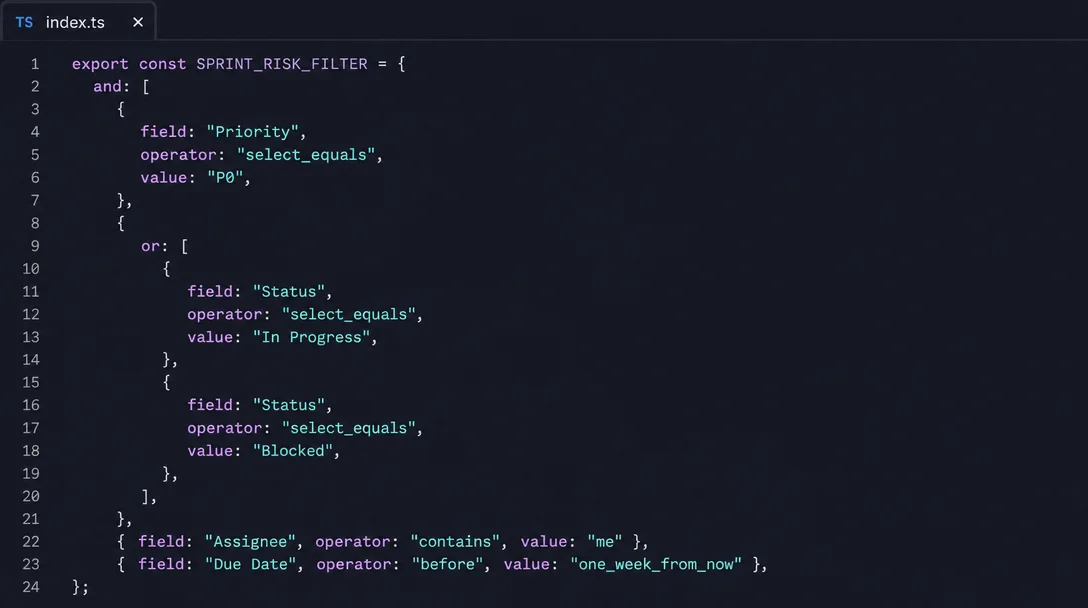
Build a sprint risk dashboard with Notion API compound filters
The Notion API's compound filter nests `and`/`or` conditions up to two levels deep, mirroring the Notion UI filter panel exactly. This tip walks through a complete `SPRINT_RISK_FILTER` (P0 + In Progress|Blocked + `"me"` + due within a week), wraps it in a Notion Worker as a `sprintRiskDashboard` tool using `iteratePaginatedAPI` for automatic pagination, provides three drop-in PM filter variants, and documents four gotchas: `"me"` returning nothing for internal integrations, UTC-only date resolution, the `timestamp` filter's prohibition on the `property` field, and the 10,000-row pagination ceiling.

What you need: Business or Enterprise plan (Notion Workers free beta through August 11, 2026). Workers require the
ntn CLI and a Notion integration token. 1 2Pulling sprint risk items from a Notion database sounds simple — until you need to match four conditions at once: P0 priority, and (in progress or blocked), and assigned to you, and due within a week. The Notion API's compound filter handles this nesting in a single query, no post-processing required.
This tip shows the exact filter shape, wraps it in a Notion Worker as a callable tool, and covers the four gotchas that cause silent empty results.
How compound filters work
A compound filter uses an
and or or key whose value is an array. Each element can be a single property filter or a nested compound filter. 3"A compound filter condition contains anandororkey with a value that is an array of filter objects or nested compound filter objects. Nesting is supported up to two levels deep." — Notion API documentation 3
Two-level limit is the hard ceiling.
{and: [{or: [{and: [...]}]}]} is the deepest legal shape — outer and = level 0, inner or = level 1, innermost and = level 2. Send a third level and the API returns a validation error. 4The API nesting mirrors the Notion UI exactly: "And" chains in the filter panel become
and arrays, "Or" groups become or arrays.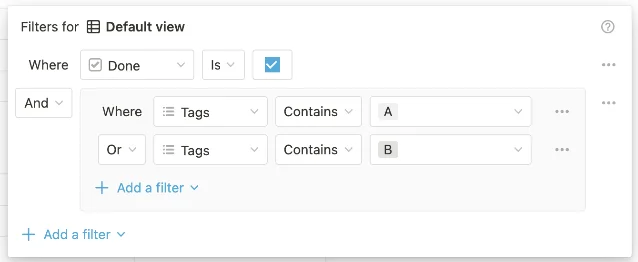
The sprint risk filter
Four conditions on a typical PM sprint database — Priority, Status, Assignee, and Due Date — fit comfortably within the two-level limit: one top-level
and with a nested or for Status:const SPRINT_RISK_FILTER = {
and: [
{
property: "Priority",
select: { equals: "P0" },
},
{
or: [
{ property: "Status", status: { equals: "In Progress" } },
{ property: "Status", status: { equals: "Blocked" } },
],
},
{
property: "Assignee",
people: { contains: "me" },
},
{
property: "Due Date",
date: { before: "one_week_from_now" },
},
],
} as const;The
date: { before: "one_week_from_now" } value is a relative date that the API resolves at query time — no hardcoded timestamps needed. 3 The seven supported relative values are: today, tomorrow, yesterday, one_week_ago, one_week_from_now, one_month_ago, and one_month_from_now.One prerequisite for
contains: "me": this shorthand only resolves when your Worker uses a Personal Access Token (PAT) or an OAuth public connection. It silently returns zero results with an internal integration token — see the Gotchas section below.Full Worker implementation
The filter above plugs directly into a
worker.tool() call. iteratePaginatedAPI (from @notionhq/client) turns the paginated database query into an async iterator so you never manage start_cursor manually. 5"This utility turns any paginated API into an async iterator." — Notion SDK README 5
Loading content card…
import { Worker } from "@notionhq/workers";
import { j } from "@notionhq/workers/schema-builder";
import { iteratePaginatedAPI } from "@notionhq/client";

const worker = new Worker();
export default worker;

worker.tool("sprintRiskDashboard", {
  title: "Sprint Risk Dashboard",
  description:
    "Query the sprint database for P0 items that are In Progress or Blocked, " +
    "assigned to me, and due within one week. Returns a formatted risk summary.",
  schema: j.object({
    databaseId: j.string().describe("UUID of the sprint tracker database."),
  }),
  outputSchema: j.object({
    summary: j.string(),
    count: j.number(),
    overdue: j.number(),
  }),
  execute: async ({ databaseId }, { notion }) => {
    const results: Array<{
      name: string; status: string; priority: string;
      dueDate: string; assignee: string;
    }> = [];

for await (const page of iteratePaginatedAPI(
      notion.databases.query,
      { database_id: databaseId, filter: SPRINT_RISK_FILTER }
    )) {
      if (!("properties" in page)) continue;
      const props = page.properties as Record<string, any>;

results.push({
        name: props["Task name"]?.title?.[0]?.plain_text
              ?? props["Name"]?.title?.[0]?.plain_text ?? "(untitled)",
        status: props["Status"]?.status?.name
                ?? props["Status"]?.select?.name ?? "—",
        priority: props["Priority"]?.select?.name ?? "—",
        dueDate:  props["Due Date"]?.date?.start ?? "—",
        assignee: props["Assignee"]?.people
                  ?.map((p: any) => p.name ?? p.email ?? p.id).join(", ") ?? "—",
      });
    }

const now = new Date().toISOString().split("T")[0];
    const overdue = results.filter(r => r.dueDate !== "—" && r.dueDate < now).length;

const tableRows = results
      .map((r, i) =>
        `| ${i + 1} | ${r.name} | ${r.status} | ${r.priority} | ${r.dueDate} | ${r.assignee} |`)
      .join("\n");

const summary = [
      `## 🚨 Sprint Risk Dashboard — ${now}`,
      `**Total at-risk items:** ${results.length}  **Overdue:** ${overdue}`,
      `| # | Task | Status | Priority | Due Date | Assignee |`,
      `|---|------|--------|----------|----------|----------|`,
      tableRows,
      results.length === 0 ? `✅ No P0 items at risk.`
                           : `⚠️ ${overdue} item(s) past due — review immediately.`,
    ].join("\n");

return { summary, count: results.length, overdue };
  },
});
Deploy and call
# Set secrets and deploy
ntn workers env set NOTION_API_KEY=ntn_xxxxxxxx
ntn workers env set NOTION_VERSION=2026-03-11
ntn workers deploy

# Test locally before deploying
ntn workers exec sprintRiskDashboard --local \
  -d '{"databaseId": "your-database-uuid-here"}'

# Or invoke from a Notion Custom Agent:
# "Run sprint risk dashboard on database [paste ID]"
Once deployed, the tool is available to any Custom Agent in your workspace. You can also trigger it on a schedule with
ntn workers sync. 1Cost note: Workers are free through August 11, 2026 on Business and Enterprise plans. After that, each run costs approximately $0.0023 (~4,348 runs per $10). A daily cron run costs about $0.07/month. 2
Three drop-in filter variants
Swap
SPRINT_RISK_FILTER with any of these to answer different PM questions — no other code changes required.My blocked items (daily standup view):
const MY_BLOCKED_FILTER = {
  and: [
    { property: "Assignee", people: { contains: "me" } },
    { property: "Status", status: { equals: "Blocked" } },
  ],
};
Team items in review this week:
const TEAM_REVIEW_THIS_WEEK_FILTER = {
  and: [
    { property: "Status", status: { equals: "In Review" } },
    { property: "Due Date", date: { this_week: {} } },
  ],
};
this_week: {} takes an empty object — the API resolves the current week window at query time. 3Unassigned P0s (for sprint planning):
const UNASSIGNED_P0_FILTER = {
  and: [
    { property: "Priority", select: { equals: "P0" } },
    { property: "Assignee", people: { is_empty: true } },
  ],
};
Gotchas
contains: "me" returns nothing for internal integrations. The "me" shorthand resolves to the user associated with the token. For internal integrations, there is no associated user — contains: "me" always returns an empty result set, and does_not_contain: "me" matches every row. 4 Use a Personal Access Token (PAT) or OAuth public connection if you need "me" to resolve correctly. Alternatively, pass an explicit user UUID obtained from the List users endpoint.Date filters default to UTC, not your local timezone. Relative values like
"one_week_from_now" resolve against UTC midnight. If your team is in UTC−7, a query run at 10 pm local time is already querying the following UTC day. 4 In production Workers, compute an explicit ISO 8601 string with timezone offset instead: new Date(Date.now() + 7 * 86400000).toISOString().timestamp filters must omit the property field. When filtering by created_time or last_edited_time, use the timestamp key directly — providing a property field alongside it triggers an API error. 3 Correct shape: { timestamp: "created_time", created_time: { past_week: {} } }.The 10,000-row pagination ceiling. The data source query endpoint stops paginating at 10,000 results per query and sets a
request_status field on the response to signal the truncation. 6 For sprint databases this is rarely a concern, but for organization-wide roadmap databases with thousands of archived items, add a last_edited_time window filter to keep result sets well below the ceiling.Setup prerequisites
If you haven't deployed a Notion Worker before:
- Create an integration at notion.com/my-integrations — copy the
ntn_secret and enable the "Read content" capability. - Get the database ID from your sprint database URL:
notion.so/{workspace}/{database-id}?v=...— the 32-character UUID before?v=. - Connect the integration to the database: open the database →
...menu → Add connections → select your integration. The API returns 404 until this step is done. 6 - Install the CLI and scaffold:
curl -fsSL https://ntn.dev | bashthenntn workers new. - Replace
src/index.tswith the full Worker code above, then deploy.
Loading content card…
Cover image: AI-generated illustration of the SPRINT_RISK_FILTER TypeScript object
Add more perspectives or context around this Drop.